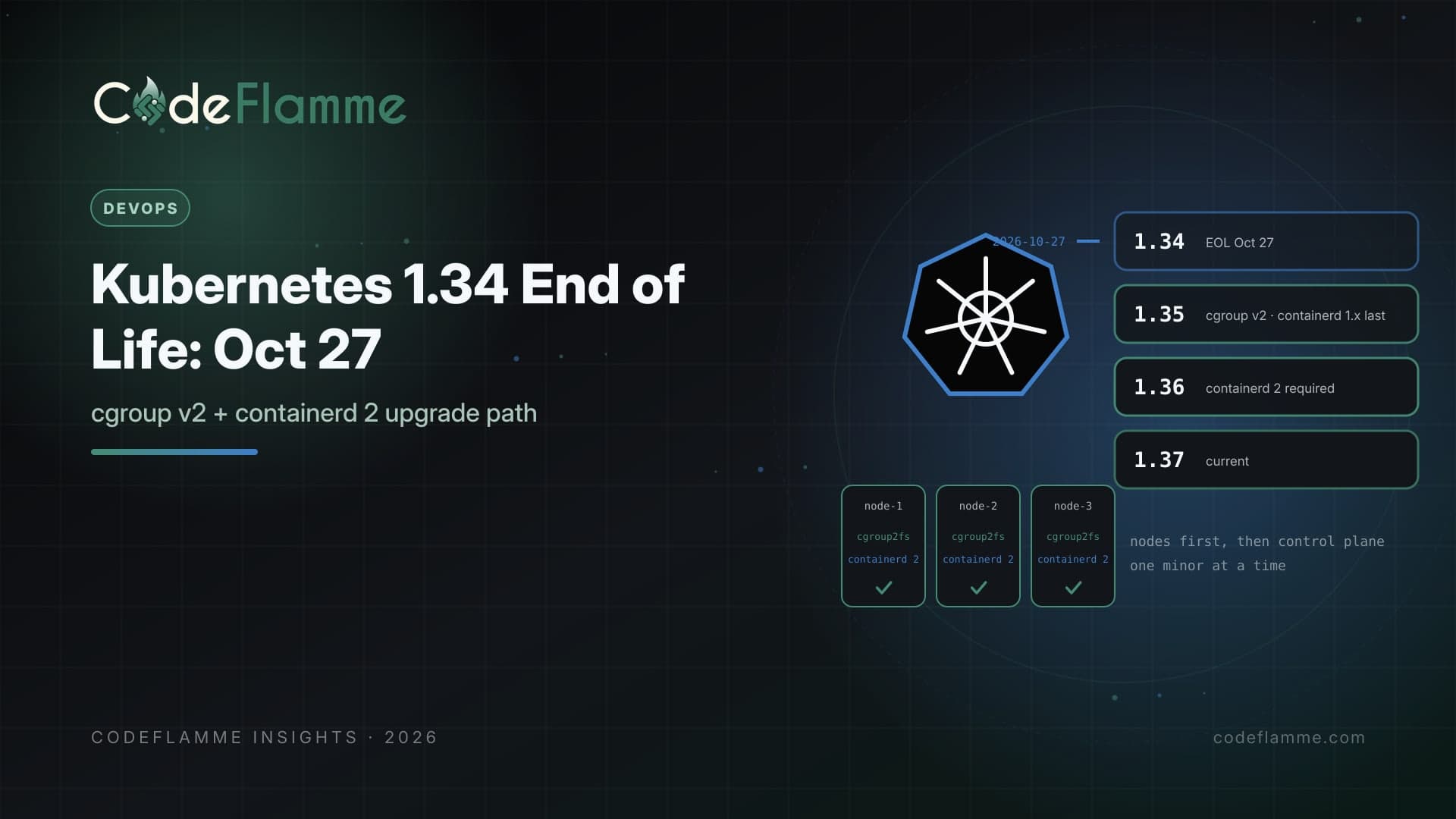
Kubernetes keeps three minor versions in support, and every few months one falls off the end. According to the project's releases page, Kubernetes 1.34 reaches end of life on October 27, 2026. Its latest patch, 1.34.12, shipped on September 15. After the end-of-life date, the supported versions are 1.35 (end of life February 28, 2027), 1.36 (June 28, 2027), and 1.37 (October 28, 2027). If you run managed Kubernetes, your provider has its own calendar, and it is often more forgiving than upstream. That is useful, but it is not a plan. Extended support windows usually cost more per cluster, and they only delay the same changes. The upgrade from 1.34 to 1.35 carries a few node-level changes that are much easier to handle on purpose than during a forced upgrade.
What changes on the way to 1.35
cgroup v1 nodes stop working by default. A Kubernetes blog post on October 6, 2026 explains that starting with 1.35, the kubelet setting failCgroupV1 defaults to true, so the kubelet will not start on a cgroup v1 node unless you explicitly set failCgroupV1: false . For kubeadm clusters, the preflight check now errors on cgroup v1 during init, join, and upgrade when the kubelet is 1.35 or newer. The same post says the cgroup v1 fallback is scheduled for removal in 1.38, so the override is a bridge, not a destination. containerd 1.x reaches its last supported release. The 1.35 release announcement designated 1.35 as the final version to support the containerd 1.x series. Before you move to 1.36, nodes need containerd 2.0 or later, and the kubelet_cri_losing_support metric shows which nodes are affected. kube-proxy ipvs mode is deprecated. It still works in 1.35 but logs a warning at startup. The project recommends nftables on Linux.
A sequence that keeps production calm
1. Inventory nodes, not just clusters. For each node pool, record the OS image, kernel version, cgroup mode, and container runtime version. Managed node pools built from older images are the usual surprise. 2. Fix the nodes first. Move every Linux node to a cgroup v2 image with containerd 2.x while the control plane is still on 1.34. That separates node changes from control plane changes, so if something breaks you know which change caused it. 3. Check workloads that read cgroups. Monitoring agents, older JVMs, language runtimes that size thread pools from cgroup limits, and anything mounting /sys/fs/cgroup may need upgrades. The Kubernetes cgroup v2 guidance lists minimum versions for cAdvisor, Java, Node.js, and automaxprocs. 4. Upgrade the control plane one minor at a time. Control planes move 1.34 to 1.35 to 1.36, never skipping. Nodes may lag up to three minor versions behind the control plane under the version skew policy, but staying that far behind just stacks up work for later. 5. Re-run your deprecation checks. Scan manifests and Helm charts for removed APIs before each hop, and run your integration suite against a staging cluster on the target version.
# On each node: cgroup2fs means cgroup v2
stat -fc %T /sys/fs/cgroup/

# Container runtime version per node
kubectl get nodes -o custom-columns=NAME:.metadata.name,RUNTIME:.status.nodeInfo.containerRuntimeVersion,KERNEL:.status.nodeInfo.kernelVersion

# Nodes the kubelet flags as losing CRI support (Prometheus)
# kubelet_cri_losing_support > 0
Two adjacent cleanups worth doing now
Ingress NGINX. The Kubernetes project announced that the community Ingress NGINX controller would receive only best-effort maintenance until March 2026 and then be archived, with Gateway API as the recommended path. If you still run it, add the migration to the same quarter as your cluster upgrade, starting with non-critical routes. Proxy mode. If you use ipvs, test nftables in a staging cluster and watch connection behavior under load before switching production node pools.
What to tell customers and auditors
Enterprise security questionnaires increasingly ask whether infrastructure runs on supported versions. A clear policy, such as running only upstream-supported Kubernetes minors and completing upgrades within one quarter of a version's end of life, is easy to state and easy to evidence with your upgrade tickets. It also gives your team a predictable rhythm instead of a scramble every time a provider sends a deprecation email.
Managed clusters still need a plan
On managed platforms such as EKS, GKE, and AKS, the provider upgrades the control plane on its own schedule once standard or community support ends, and extended or long-term support options typically cost extra or require a specific tier. Automatic control plane upgrades do not fix node images you built yourself, custom AMIs, or self-managed node groups. Check your provider's release calendar for each cluster, decide whether you will upgrade before standard support ends or pay for extended support deliberately, and put the date in the team calendar.
Rehearse the rollback
Control plane upgrades cannot be rolled back in place, so your safety net is at the node and workload level. Upgrade node pools with surge capacity, keep the previous node image available, and use PodDisruptionBudgets so critical services keep enough replicas during drains. Practice the full sequence on a staging cluster that mirrors production add-ons, including your ingress controller, service mesh, and monitoring agents, because add-ons are where version incompatibilities usually hide.
Founder takeaway
October 27 is a forcing function, not a cliff, especially on managed platforms. Use it. Inventory cgroup and runtime versions per node pool this week, move nodes to cgroup v2 and containerd 2 before touching the control plane, then step through 1.35 and 1.36 with staging tests at each hop. Fold in the Ingress NGINX migration while you are there, and write the upgrade policy down.