React Native 0.88 shipped on October 19, 2026 with a line that matters more to iOS teams than any feature in it: the core team plans to make Swift Package Manager the default for iOS in 0.89, with CocoaPods kept only as an opt-out for apps that are still blocked. After that, the team says, CocoaPods support will be removed in a later release. For most of React Native's life, pod install has been the step every iOS developer runs, forgets, and then debugs. Moving to SwiftPM changes how native dependencies get into your Xcode project, how CI builds the app, and which third-party libraries you can keep. None of it is urgent today. All of it is cheaper to plan now than to discover when the 0.89 upgrade lands on a sprint you had planned for features.
What the React Native team has actually announced
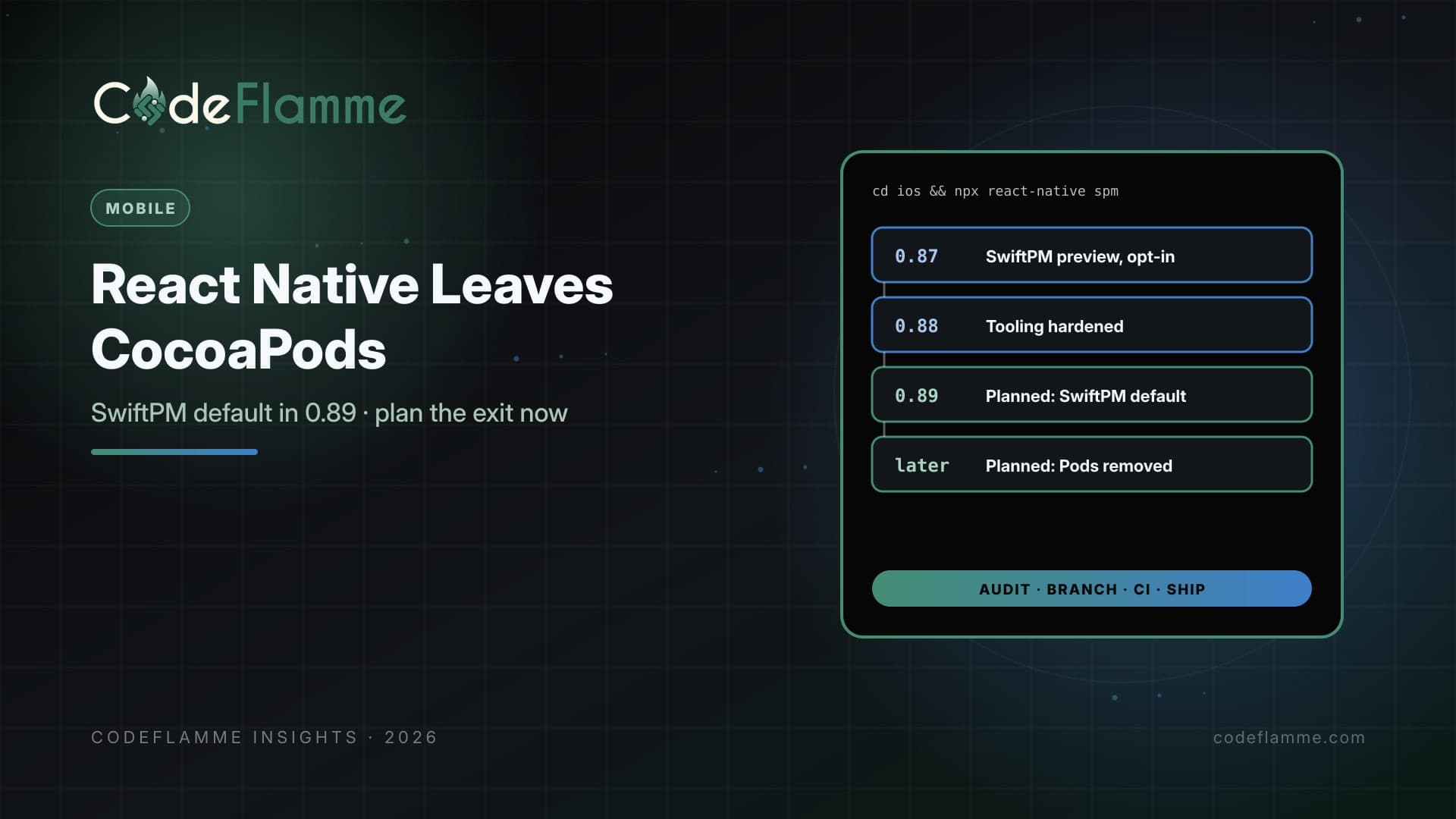
The rollout has three published steps, all from the official release posts: 0.87 (August 11, 2026). React Native 0.87 added experimental Swift Package Manager support for iOS as an opt-in alternative to CocoaPods. It uses the same prebuilt XCFrameworks React Native already publishes and needs only Xcode, with no Ruby, Bundler or CocoaPods. The team was explicit that it should not be used in production yet. 0.88 (October 19, 2026). SwiftPM is still experimental and opt-in, and CocoaPods is still fully supported. The tooling was hardened with feedback from real apps: generated manifests now read the minimum iOS version from your app's deployment target, Xcode builds no longer break for libraries that ship their own Package.swift , and libraries can declare SwiftPM settings in a swiftpmConfig section of package.json . 0.89 (planned). SwiftPM becomes the default target, with an opt-out to CocoaPods. CocoaPods removal follows in a later, unnamed release. No date has been published for 0.89, so treat any date you see elsewhere as a guess.
Why founders should care about a build tool
This sounds like plumbing, and mostly it is. But it touches three things founders do care about: release speed, vendor risk, and upgrade cost. On release speed, the SwiftPM path removes the Ruby and CocoaPods toolchain from the iOS build. The 0.87 post describes a one-time setup command, after which adding or removing a native package simply triggers autolinking on the next build, with no separate install step. Fewer moving parts in CI usually means fewer red builds that have nothing to do with your code. On vendor risk, every native SDK in your app now needs a SwiftPM story. Payments, analytics, push, maps, SSO, video calling: if any of them ships only as a CocoaPod, it becomes the item that holds your whole upgrade back. React Native provides a scaffold command that can generate a Package.swift from a library's podspec, which helps, but closed-source SDKs and heavily customised pods are where that tends to need hands-on work. On upgrade cost, React Native's support policy only covers the latest few versions. When 0.88 shipped, 0.85 moved to unsupported, as we covered in our React Native 0.88 upgrade cadence post . Staying on CocoaPods forever is not an option if you also want to stay on a supported version.
A dependency audit you can run this week
Before anyone touches the Xcode project, make a list. Open your Podfile.lock and your package.json , and for every native dependency note three things: whether it ships a Package.swift , whether it declares a swiftpmConfig block, and whether the vendor has said anything about SwiftPM. Sort the list into three groups: ready, can be scaffolded, and blocked. The blocked group is your real work. For each one, ask whether there is a maintained alternative, whether the vendor has a published timeline, or whether you can drop the feature. It is also a good moment to remove native libraries you no longer use. Most apps we look at carry at least one.
# On a throwaway branch, never on main
cd ios
npx react-native spm --deintegrate   # adds Swift package references to the existing .xcodeproj

# For a library with no Package.swift
npx react-native spm scaffold

# Undo the change exactly
npx react-native spm deinit
These commands come from the 0.87 and 0.88 release posts. The team notes that commands, flags and generated layout may still change, so treat the branch as a rehearsal, not a migration.
How we would sequence it
Now, on 0.88. Run the audit, then try the SwiftPM path on a branch and a single developer machine. Build a release configuration, not just debug, and run it on a real device. Note every library that fails and why. Report real blockers to the React Native team through RFC #0994, which the release post links to, since the default is being set based on that feedback. Your CI. The 0.87 post says that after a fresh clone, and in CI, you run npx react-native spm once before building, the way you run pod install today. Add that as an experimental CI job alongside the existing one, so you learn about cache and runner problems before they block a release. If your runners are also behind on Node, our Node.js 26 LTS upgrade plan covers the runtime side. When 0.89 arrives. Upgrade with SwiftPM as the default if the audit is clean. If one blocker remains, use the CocoaPods opt-out for that release, and put a dated owner on removing it. The opt-out is a bridge, not a place to live. If you are on Expo. Expo manages much of the native project for you, so the change will reach you through Expo's own SDK releases. Check Expo's changelog for its SwiftPM guidance rather than running the React Native commands on a managed project. Our Expo SDK 58 upgrade plan covers the current release.
What this means if you are choosing a stack
If you are deciding between React Native and Flutter right now, this change is a sign of a maturing toolchain, not a reason to switch. Both ecosystems periodically move their native build systems, and both cost a few days of engineering when they do. Our React Native vs Flutter guide covers the decision on its merits. If you already have a React Native app in production, the honest summary is this: budget a few days for the audit and the branch trial this quarter, and a bigger slice of the 0.89 upgrade for whatever the audit flags. Teams that do the audit early tend to upgrade on their schedule. Teams that skip it tend to upgrade when a library forces them to. Not sure which of your native SDKs will block the move? Talk to the CodeFlamme team and we will run the dependency audit with you.