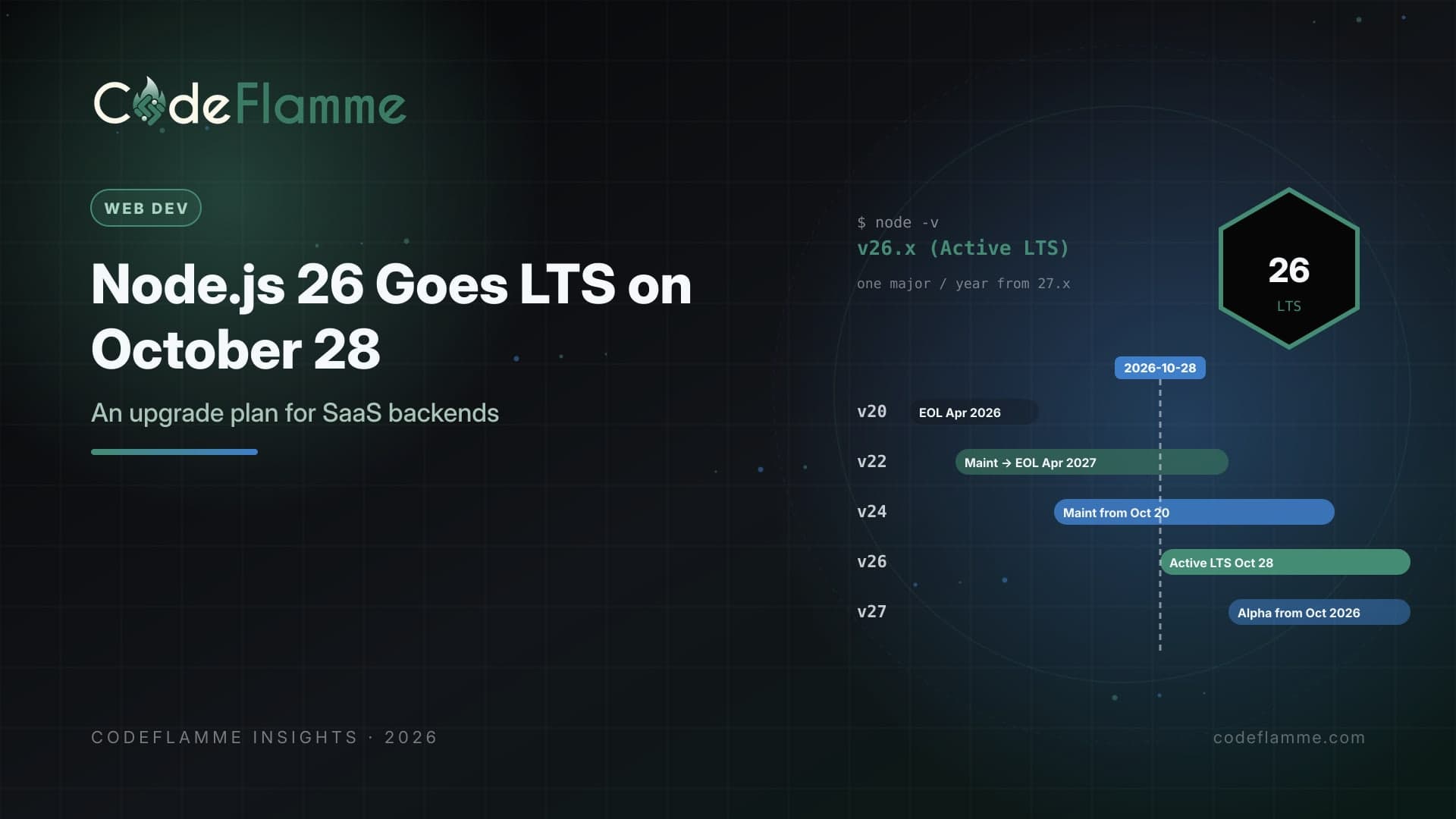
Every October the Node.js project promotes a new release line to Long-Term Support, and every October a lot of SaaS teams quietly add another year of drift to their backend. This year the calendar is unusually tidy. According to the project's published schedule, Node.js 24 moves from Active LTS to Maintenance on October 20, 2026, and Node.js 26 becomes Active LTS on October 28, 2026. Node.js 22 has been in maintenance since October 2025 and reaches end of life on April 30, 2027. Node.js 20 already reached end of life on April 30, 2026. If your API, workers, or Next.js servers still run on 20, you are already outside the support window. If you are on 22, you have roughly six months. If you are on 24, you are fine for now, but your next planned move should be 26, not another year of waiting.
What actually changes on October 28
Nothing breaks on the day a line becomes LTS. The promotion is a promise: from that point, the release line receives the conservative, security-focused treatment that production teams want, and the project commits to supporting it until April 30, 2029. That makes Node.js 26 the line with the longest remaining runway, about two and a half years, for anyone planning infrastructure that should survive the next funding round. Moving early in the LTS window means you upgrade once and then ride patch releases instead of planning another migration next year.
The release model is changing after 26
The Node.js project has announced that starting with 27.x it will ship one major release per year instead of two. New majors arrive in April, are promoted to LTS in October, and every release line becomes LTS, so the odd and even distinction disappears. An Alpha channel, starting in October 2026, replaces the role odd-numbered releases used to play for early testing, and semver-major changes are allowed there. Version numbers will align with the calendar year of their first Current release, so 27.0.0 lands in 2027. For a SaaS team, the practical effect is predictability. Plan one runtime upgrade a year, every autumn, and treat it like any other recurring maintenance item. Node.js 26 is the last line under the old model, which makes it a natural reset point for teams that have fallen behind.
A five-step upgrade plan
1. Inventory every runtime. Backends rarely run on one version. List the Node.js version for each API service, background worker, cron job, serverless function, CI runner, and local development setup. Docker base images, .nvmrc files, the engines field in package.json , and your hosting provider's runtime setting often disagree with each other. 2. Test on 26 in CI now. Add Node.js 26 to your CI matrix before October 28 so incompatibilities show up while the change is still optional. Native add-ons, older build tooling, and packages that pin narrow engine ranges are the usual sources of trouble. 3. Upgrade one service first. Pick a low-risk internal service or worker, ship it on 26, and watch memory, latency, and error rates for a week. Runtime upgrades often change performance characteristics in small ways that only show up under real load. 4. Roll through the fleet. Move customer-facing APIs next, then everything else, using your normal progressive delivery process. Keep the previous image tag available for a fast rollback. 5. Lock it in. Update base images, version files, engine constraints, and documentation in the same pull request so new services do not start life on an old runtime.
# Pin the runtime everywhere, in one change
echo "26" > .nvmrc
npm pkg set engines.node=">=26 <27"

# Dockerfile
# FROM node:26-slim

# CI matrix (GitHub Actions example)
# strategy:
#   matrix:
#     node: [24, 26]
Where upgrades usually go wrong
The runtime itself is rarely the problem. The trouble is usually in the dependency tree: a native module without prebuilt binaries for the new version, a testing tool that patches internals, or an old ORM release that has not been tested on the new line. Check your lockfile for packages that declare engine ranges excluding 26, upgrade major framework dependencies first, and run your full integration suite rather than unit tests alone. If you self-host, also review container memory limits after the upgrade, because garbage collection behavior can shift between major versions. Do not adopt every new API on day one. Recent 26.x releases added conveniences such as util.throttle , util.debounce , and crypto.parsePKCS12() , but code that depends on them cannot easily roll back to 24. Upgrade the runtime first, stabilize, then adopt new APIs deliberately.
What to tell customers and auditors
Enterprise security questionnaires increasingly ask whether production components run on supported versions. Running an end-of-life runtime is an easy finding for an auditor and an uncomfortable conversation during procurement. A short internal policy, such as “production services run on an Active or Maintenance LTS Node.js line, and we upgrade to each new LTS within one quarter of its promotion,” gives your sales and security teams a clear, defensible answer.
Do not forget the edges
Serverless platforms, managed build systems, and edge runtimes follow their own schedules for adding new Node.js versions. Check when your hosting provider supports 26 for functions and builds, and whether it plans to retire older runtimes. The same goes for tooling images in CI, such as linters and test runners pinned to an old base image, which quietly keep an unsupported version alive long after production has moved on.
Founder takeaway
October 28 is a good forcing function. Get Node.js 26 into your CI matrix this month, upgrade one service before the end of October, and plan the rest of the fleet for the following weeks. If any production service still runs on Node.js 20, fix that first, since it is already unsupported. With the project moving to one major release a year, treat runtime upgrades as an annual habit and they stop being projects at all.